
Postal
PricingLearnNews

Guide

AI tags, and how your reviews train them

How Postal tags your tracks, every tag it can use, and how to review, add and remove tags so the model keeps getting better.
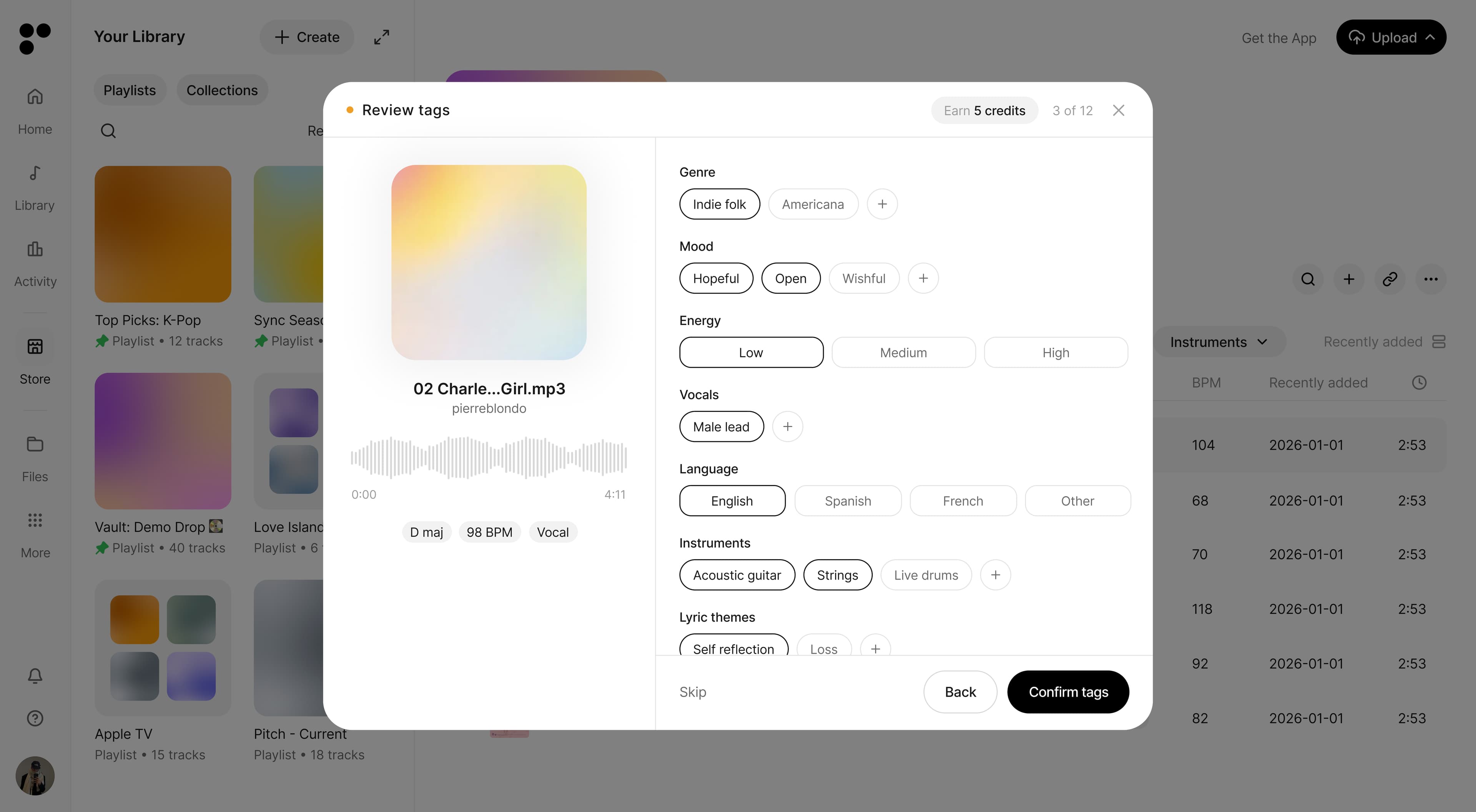
A Postal track with AI-generated metadata tags
How tagging works
  • Where tags come from
  • Why your review matters
Every tag, by category
  • Genre (39 tags)
  • Mood (43 tags)
  • Instruments (27 tags)
  • Vocals (18 tags)
  • Lyric themes (53 tags)
  • Type (20 tags)
  • Era, Character & Movement (new)
Reviewing tags
  • Open the review queue
  • Accept or reject suggestions
  • Add what's missing
  • Confirm and move on
Editing tags anytime
  • Edit a single track
  • Edit many tracks at once
  • Turn auto-tagging on or off

When you upload a track, Postal listens to the audio and suggests tags for it: genre, mood, instruments, vocals and more. No tag is guessed from the filename or title — everything comes from the sound itself. This guide explains where those tags come from, lists every tag the system can use, and shows you how to review them. Your reviews are not just cleanup: they are the signal we use to make the tagger better for everyone.

Where tags come from

Two independent models listen to every track — one built on classic audio analysis, one on a general audio-understanding model. Each tag has its own confidence bar, and a tag is only suggested when a model clears it. When both models agree on a tag independently, it ranks higher in the suggestions. In practice that means the top suggestions on a track are the ones the system is most sure about, and anything borderline simply doesn't show up.

BPM and key work differently: they aren't tags but measurements, detected directly from the audio. Lyric themes come from the transcribed lyrics, never from the sound.

Three of the newest categories — Era, Character and Movement — don't have a trained model yet. For those, the system makes a best-effort first guess by comparing the track against written descriptions of each tag. They are the least reliable suggestions in the product right now, which is exactly why they appear in review: your corrections become the training set for their first real models.

Why your review matters

Every time you confirm, reject or add a tag, that decision is recorded together with the exact model version that made the suggestion. Here is what actually happens with it:

  • Confirmations keep the training data honest. A tag that a human confirmed is worth far more to training than a tag the machine applied to itself. Your reviews are how we tell the two apart, so the model learns from real judgement instead of its own guesses.
  • Corrections on Era, Character and Movement train the first models. These categories are bootstrapped from descriptions, and reviewer corrections are literally the dataset their first trained versions will learn from.
  • Tags you add are the most valuable of all. If you tag something the system never suggests — a banjo, a cello, a mood it keeps missing — you are handing it exactly the examples it lacks.
  • Rejections tell us where to look. Tracks where suggestions keep getting rejected are the ones we prioritise for expert labelling and the next retrain.

One promise we keep: your personal tags never train the shared model directly. Your reviews guide which tracks get expert attention and protect the training set from machine-made labels — they don't leak your private tagging habits into everyone else's suggestions.

Every tag, by category

The current tag set has 229 tags across eight categories. This is the full list the AI and the tag editor work from.

Tags live in a fixed, versioned vocabulary — the model is trained per version, so categories only gain or lose tags when the model is retrained. That's why you pick category tags from a list instead of typing them. If a tag you need is genuinely missing, use Additional tags in the tag editor: free-text tags are reviewed as candidates for future versions of the vocabulary.

Genre (39 tags)

Afrobeats, Alternative Rock, Ambient, Cinematic, Classical, Country, Dancehall, Deep House, Disco, Drum & Bass, Dubstep, Electronic, Electronic/Dance Music, Folk, Folk & Singer/Songwriter, Funk, Hip-Hop/Rap, House, Indie, Indie/Alternative Pop, Instrumental, Jazz/Blues, K-Pop, Latin, Lo-fi, Metal, Piano, Pop, R&B/Soul, Reggae, Reggaeton, Rock, Soundtrack, Speech, Techno, Trance, Trap, Trip-hop, World.

Mood (43 tags)

Anthemic, Atmospheric, Bright, Building, Catchy, Chill, Cinematic, Confident, Cool, Dark, Dramatic, Dreamy, Driving, Emotional, Energetic, Epic, Fun, Gritty, Happy, Hopeful, Intense, Light, Minimal, Moody, Mysterious, Party, Percussive, Playful, Positive, Powerful, Quirky, Reflective, Retro, Rhythmic, Romantic, Sad, Sexy, Slow, Swagger, Tension, Upbeat, Uplifting, Warm.

Instruments (27 tags)

Accordion, Acoustic guitar, Banjo, Bass, Brass, Cello, Clarinet, Cymbals, Drums, Electric guitar, Flute, Handclaps, Horns, Keyboard, Mallet percussion, Mandolin, Orchestral, Organ, Percussion, Piano, Saxophone, Strings, Synth, Trombone, Trumpet, Ukulele, Violin.

The AI currently detects 14 of these on its own: Bass, Brass, Clarinet, Drums, Electric guitar, Flute, Organ, Percussion, Piano, Saxophone, Strings, Synth, Trumpet and Ukulele. The rest — Accordion, Acoustic guitar, Banjo, Cello, Cymbals, Handclaps, Horns, Keyboard, Mallet percussion, Mandolin, Orchestral, Trombone, Violin — it will never suggest yet. If you hear one, add it yourself: those tags are exactly the examples the next version of the instrument model needs.

Vocals (18 tags)

A cappella, Aahs, Background vocals, Choir, Clean, Duet, Explicit, Female vocal, Foreign language, French language, German language, Harmonies, Instrumental, Male vocal, Oohs, Spanish language, Whispering, Whistling.

Lyric themes (53 tags)

Adventure, Ambition, Betrayal, Celebration, Change, Christmas, Confidence, Conflict, Connection, Death, Desire, Destiny, Discovery, Dream, Empowerment, Energy, Escape, Faith, Family, Fear, Freedom, Friendship, Fun, Gratitude, Happiness, Heartbreak, Home, Hope, Identity, Individuality, Life, Loneliness, Longing, Loss, Love, Money, Nature, New beginning, Nostalgia, Pain, Party, Power, Rebellion, Regret, Relationship, Romance, Strength, Struggle, Success, Survival, Time, Together, Unity.

Lyric themes are read from the transcribed lyrics, so instrumental tracks won't get them.

Type (20 tags)

Ad, Cover, Demo, Easy Clear, Focus Track, Instrumental, Loop, Mainstream, Master, One-shot, Onestop, Recognizable, Remix, Rerecord, Samples, Score, Sound Design, Soundtrack, Sting, Vocal.

Era, Character & Movement (new)

Era places the production sound in time: 1950s, 1960s, 1970s, 1980s, 1990s, 2000s, 2010s, Modern.

Character describes the overall texture: Bold, Ethereal, Futuristic, Heroic, Luxurious, Magical, Organic, Raw, Sophisticated, Synthetic.

Movement describes how the rhythm feels: Bouncy, Flowing, Groovy, Marching, Non-rhythmic, Pulsing, Robotic, Steady, Stomping, Swinging, Syncopated.

These three are the newest categories and the ones where your corrections matter most — there is no trained model behind them yet, and your reviews are building it.

Reviewing tags

The review queue walks you through your tracks one by one. A minute per track is all it takes.

Open the review queue

On the All Tracks page in your library, look for the Review tags button next to the search field. The badge on it shows how many tracks have suggestions waiting. The button only appears when there's something to review — and you earn credits for every track you complete.

Accept or reject suggestions

Each track shows its suggestions as chips, grouped by category. Suggested chips start selected — dark border means accepted. Click a chip to toggle it: deselect the ones that are wrong, leave the right ones selected. There's no separate accept button; the chip itself is the control.

Rejecting a wrong tag is just as useful as accepting a right one — don't leave a wrong suggestion selected because it's "close enough". The model only learns it was wrong if you tell it.

Add what's missing

Every category ends with a + button that opens a searchable picker with the full tag list for that category. If the track clearly has something the AI missed, add it — added tags are the strongest teaching signal you can give. Click an added chip again to remove it.

Below the categories you can also fill in Sounds like (free text — artists this track resembles), Energy (Low / Medium / High) and Language.

Confirm and move on

Hit Confirm tags to save. The accepted tags are written onto the track like any other tags, and your accepts, rejects and additions are recorded as feedback for training. Use Skip if you're not sure about a track, and Back to revisit the previous one. When the queue is empty you'll see "All caught up" with the credits you earned.

Editing tags anytime

You don't need the review queue to fix a tag — every track's tags are editable whenever you spot something.

Edit a single track

Open a track's menu and choose Tags. The current tags sit at the top as chips — click the X on a chip to remove it. Below, pick from the category dropdowns (Genre, Mood, Type, Lyric themes, Vocals, Instruments), or type a free-text tag under Additional tags. Hit Save when you're done.

In the library, the Tags column shows a couple of tags per track — click the +N chip to see the full grouped list.

Edit many tracks at once

Select multiple tracks and choose Tags from the selection menu. Three modes: Add puts the selected tags on every track and leaves the rest untouched, Remove strips the selected tags wherever they appear, and Replace swaps each track's full tag set for your selection.

Turn auto-tagging on or off

In Settings, the Auto-Tagging switch controls whether AI tags are applied to new uploads automatically. Turning it off offers to remove all auto-applied tags from your tracks — tags you added yourself always stay.

ProductFeaturesPricingiOS AppWhat's new
Use CasesCollaborationFile SharingSubmissions
ResourcesLearnNewsStorefrontGuidelines
CompanyContactLinkedInInstagramFacebook
Terms & PoliciesTerms of UsePrivacy PolicyCookies PolicyStorefront Terms
Product
FeaturesPricingiOS AppWhat's new
Use Cases
CollaborationFile SharingSubmissions
Resources
LearnNewsStorefrontGuidelines
Company
ContactLinkedInInstagramFacebook
Terms & Policies
Terms of UsePrivacy PolicyCookies PolicyStorefront Terms
© 2026 Postal Music Group, Inc. All rights reserved.
iOS