
Integrations
Your catalog, inside Claude and ChatGPT
Connect Postal to Claude and work your whole library by asking. Search it the way a music supervisor would describe it, build playlists, tag batches, and audit what you have.



beat_02.mp3
Run It Down v2
Cinematic trap, no vocal
This week’s uploads
managed, 3 duplicates found
Chase Cues
15 tracks, built in one message
Ask for what you need, in the words you already use
Claude reads your Postal library through a connection you control. It only sees what you ask about, your key never leaves Postal, and you can disconnect at any time.

Dark cinematic trap for a chase scene, instrumental, under 100 BPM
Search by feel, not filename
Describe what you need the way a supervisor would.
- Search by scene, mood, tempo and instrumentation, not just file names and tags
- Get ranked results with a reason for each pick
- Narrow it in the same conversation: shorter, darker, no vocal

Now put the best 15 of those in a playlist called Chase Cues

Chase Cues
15 tracks, 48 minutes
Nightline
Run It Down v2
13 more
Build the playlist in the same breath
Go from results to a named playlist without opening a tab.
- Turn what you just found into a playlist in one message
- Name it, reorder it, add to it as the conversation continues
- It lands in Postal live, ready to send

Tag and audit in bulk
Tidy a week of uploads in one pass.
- Auto-tag for genre, mood, instruments and vocals across a whole batch
- Catch duplicates matched on the audio, even under different filenames
- Find the gaps: tracks missing a BPM, a key, or a title
Claude
Connect Postal to Claude
You need a Postal account and a Claude account. Budget three minutes the first time.
1. Copy your Postal key
Log in at postal.music, then go to Settings > Integrations. Click Show, then Copy. No key yet? Click Create API key first. Treat it like a password.
 Copied
Settings, Integrations

API key
Connects Claude, ChatGPT and the API
ShowCopy sk_live_9f2c····a417
2. Add Postal as a connector in Claude
In a new chat, select the + button, then Add connector > Add custom connector. You can also add connectors from Settings > Connectors.
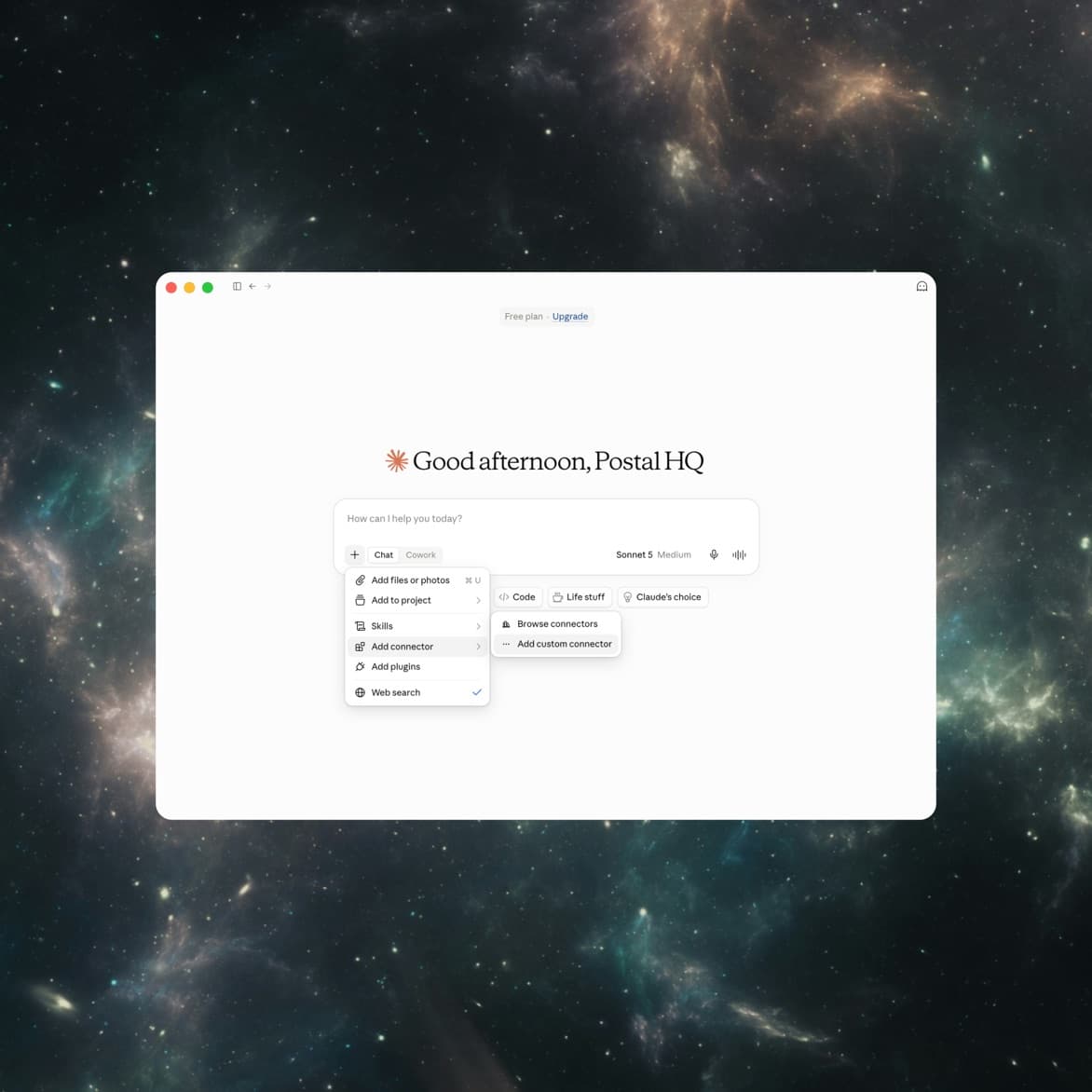
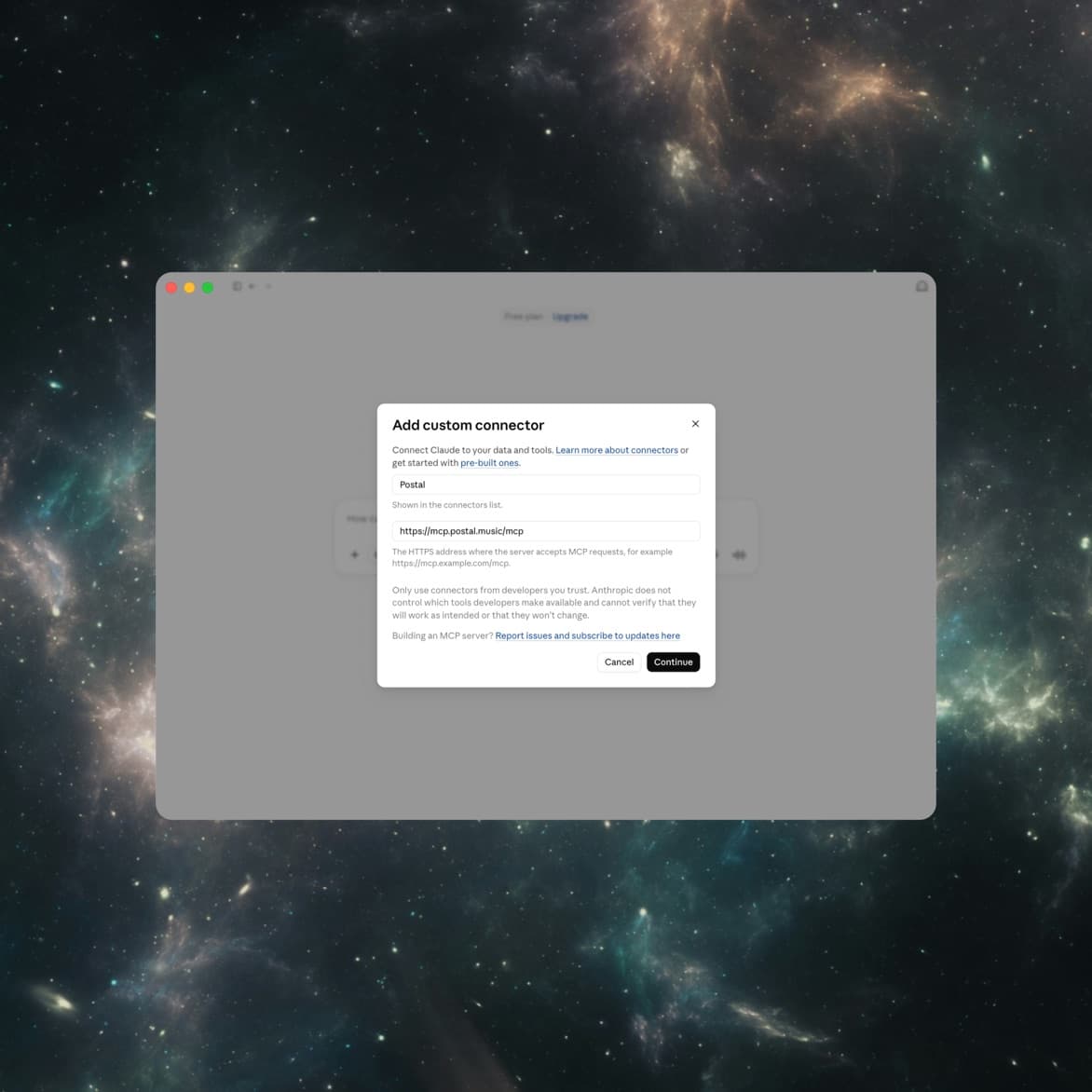
3. Enter a name and the Postal server URL
Name the connector Postal so it is easy to find in your tools menu, and enter the MCP server URL: https://mcp.postal.music/mcp. Select Continue.
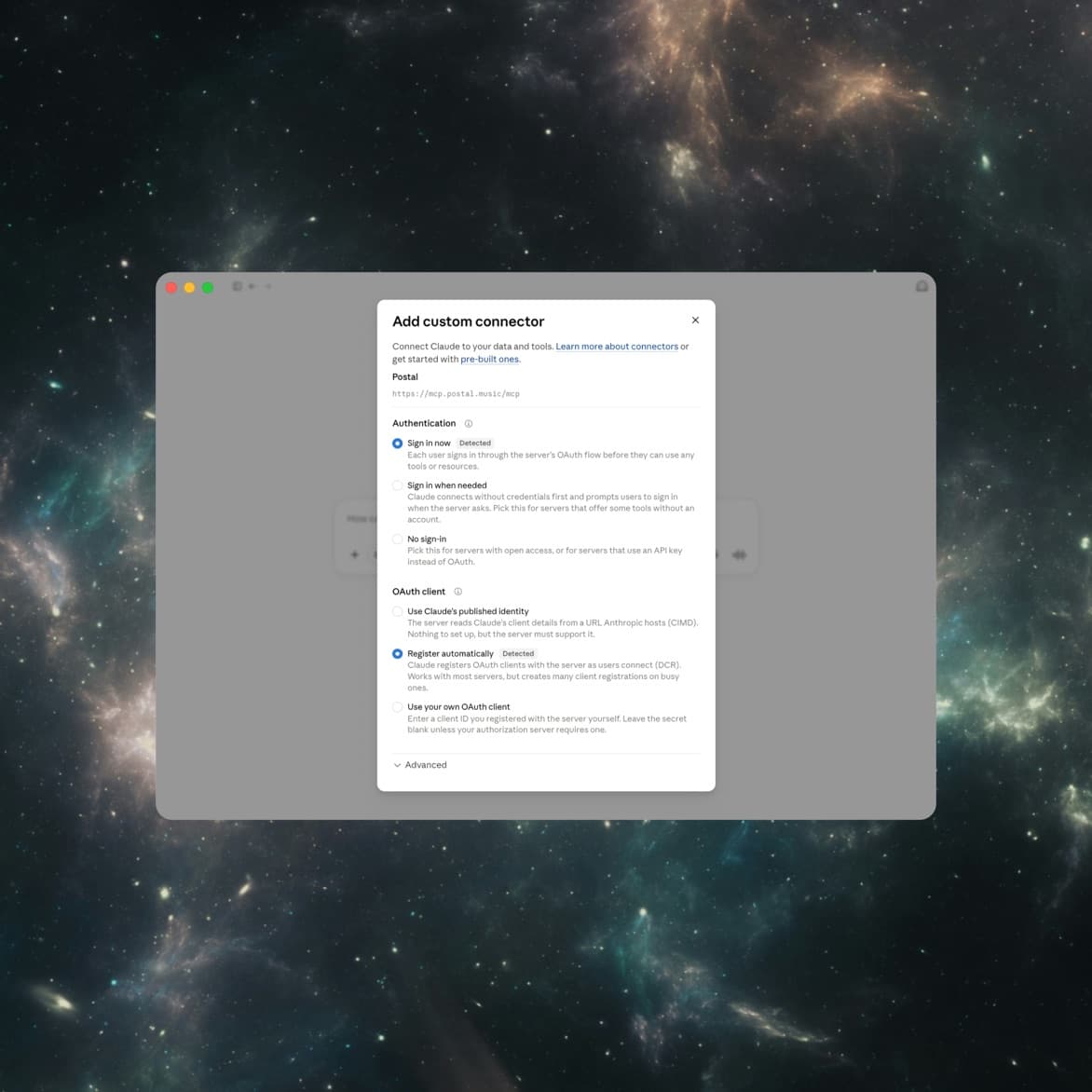
4. Keep the detected settings
Claude detects the server's settings automatically: authentication is set to Sign in now and the OAuth client registers automatically.
Leave both as detected and select Add.
5. Sign in to Postal
Paste your key when the Postal page opens and select Connect. Postal now shows a checkmark in your connector list.
Start a new chat and ask: “How many tracks are in my Postal library?”
Connected

Postal
Reads your catalog
On1,482
tracks, across 37 playlists. 112 are missing a BPM.
Postal ConnectedChatGPT
Connect it in ChatGPT
ChatGPT connects through Developer Mode, currently available on Business, Enterprise, and Edu workspaces.
1. Copy your Postal key
Log in at postal.music, then go to Settings > Integrations. Click Show, then Copy. No key yet? Click Create API key first. Treat it like a password.
CopiedSettings, Integrations
API key
Connects Claude, ChatGPT and the API
ShowCopysk_live_9f2c····a4172. Turn on Developer mode
In ChatGPT, open Settings, then Apps & Connectors, then Advanced. Turn on Developer mode. You only do this once. If you do not see it, your plan does not include custom connectors, or your workspace admin has to enable it first.
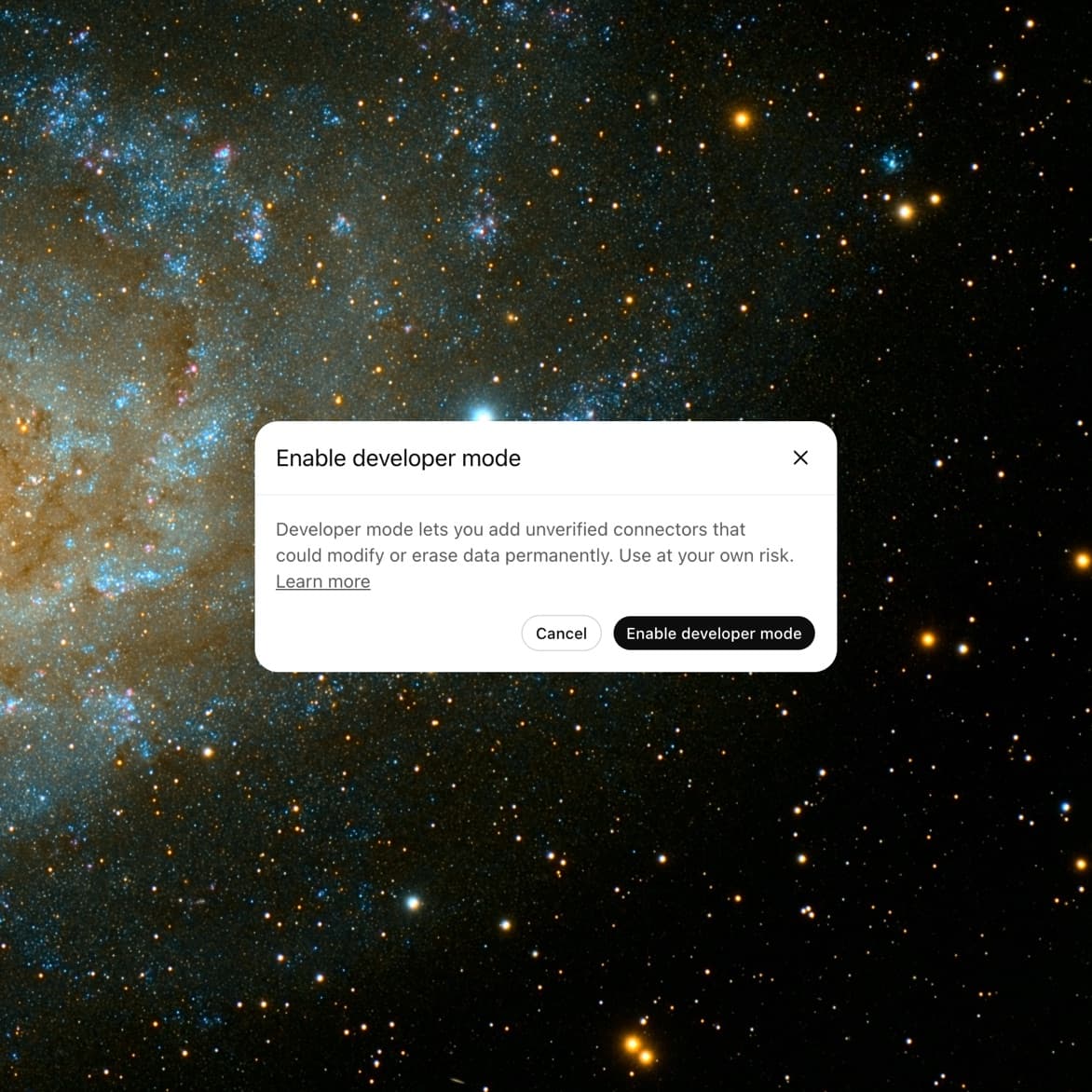
3. Create the connector
In Connectors, select Add connector. Name it Postal, add a short description, and enter the MCP server URL: https://mcp.postal.music/mcp. Select Continue.
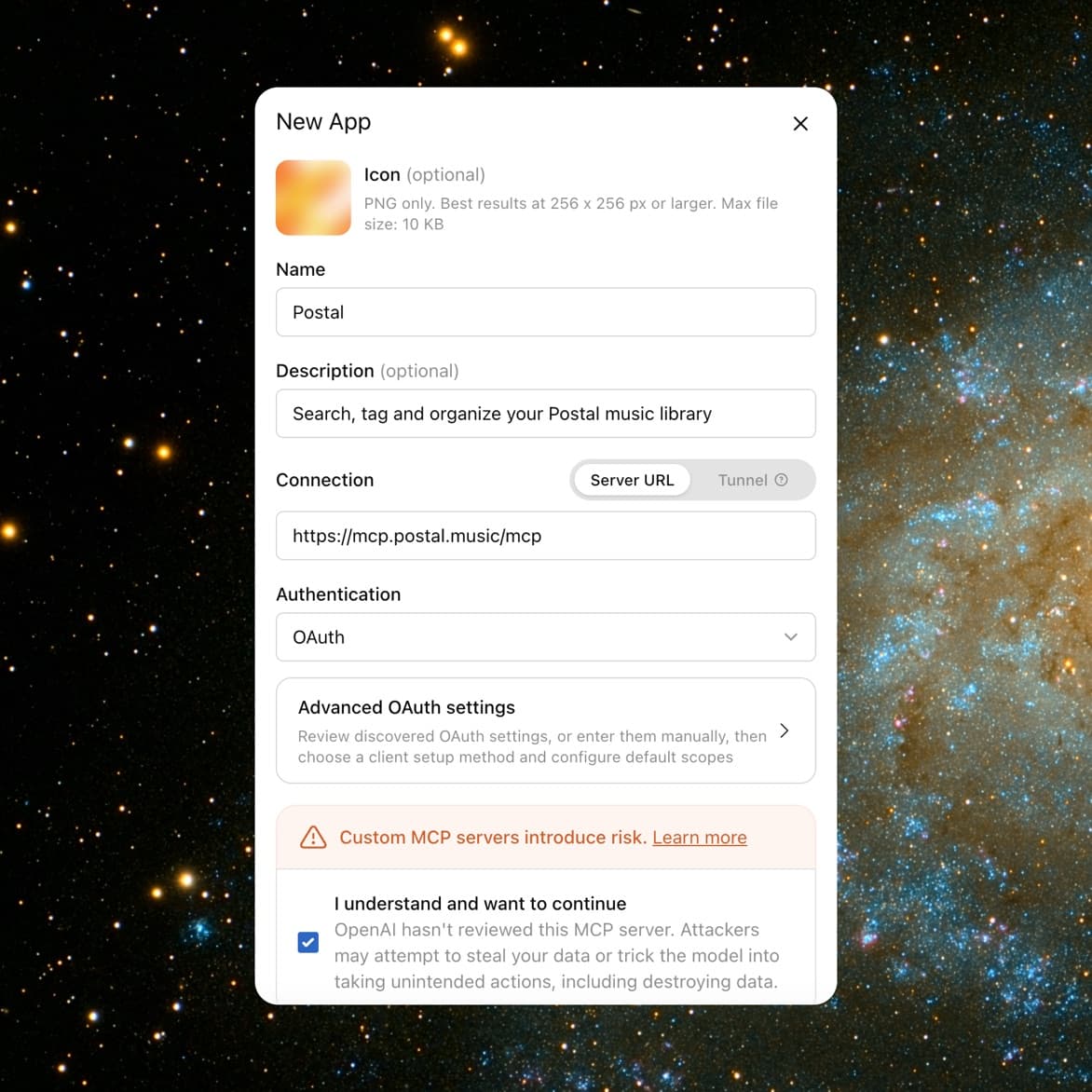
4. Sign in to Postal
ChatGPT opens a Postal page. Paste your key and select Connect. Then start a new chat, open the tools menu, and switch Postal on before you ask your first question.
Tools

Postal
12 tools available
3 found
Same audio, different filenames. Uploaded in March and July.
Postal switched onGood to know
If Claude says it can't see your library
Open the tools menu in that chat and switch Postal on. Each chat decides which connectors it uses.
“You started connecting to Postal but didn't finish”
That's Claude asking you to complete step three. Click Connect and paste your key.
Phone and desktop
Same account, same connection. Quit and reopen the app once after you connect and Postal shows up there too.
Your key never leaves Postal
Claude and ChatGPT receive a temporary pass, not the key. Revoke it in Settings > Integrations to cut access.
Nothing permanent happens without you
Anything that can't be undone, like deleting a composer, asks for your confirmation first.
Been away a month?
Connections expire after 30 days without use. Open Connectors, click Connect on Postal, and paste your key again.